 Flagship · Foundry calculation suite
JoseCast Suite
The engineering calculations a foundry makes every day, in one powerful window: fast, sourced and explainable. Free for life.

modules: charge, gating and risers, fill time, cast iron, steel, 3D and mass
languages: Turkish, English, German, Japanese, Korean and Simplified Chinese
CALPHAD family databases: cast iron, white iron, steel, stainless and tool steel
casting mass, within the validity range of the literature
Not a calculator, an engineering desk
Suite does not just give you a number; it tells you where that number comes from, which source it rests on and what changed.
Results in seconds
Turn days of trial and error into a few clicks. Open as many windows of the same module as you like and compare options side by side.
Every number has a source
Formulas come from papers, handbooks and standards. The result screen shows the formula, the source and the intermediate values.
Fits your foundry
Calibrate the fill time coefficient and the Jose theorem constants to your own practice. Every changed value is noted on screen.
Speaks the world's languages
Turkish, English, German, Japanese, Korean and Chinese. Chinese, Japanese and Korean characters are drawn with their own fonts.
Six modules, one engineering language
Each module opens in its own window; open as many windows of the same module as you like to compare options side by side. Results are calculated only when you press CALCULATE, and the result screen shows the formula, the source and the intermediate values.
Least-cost charge recipe
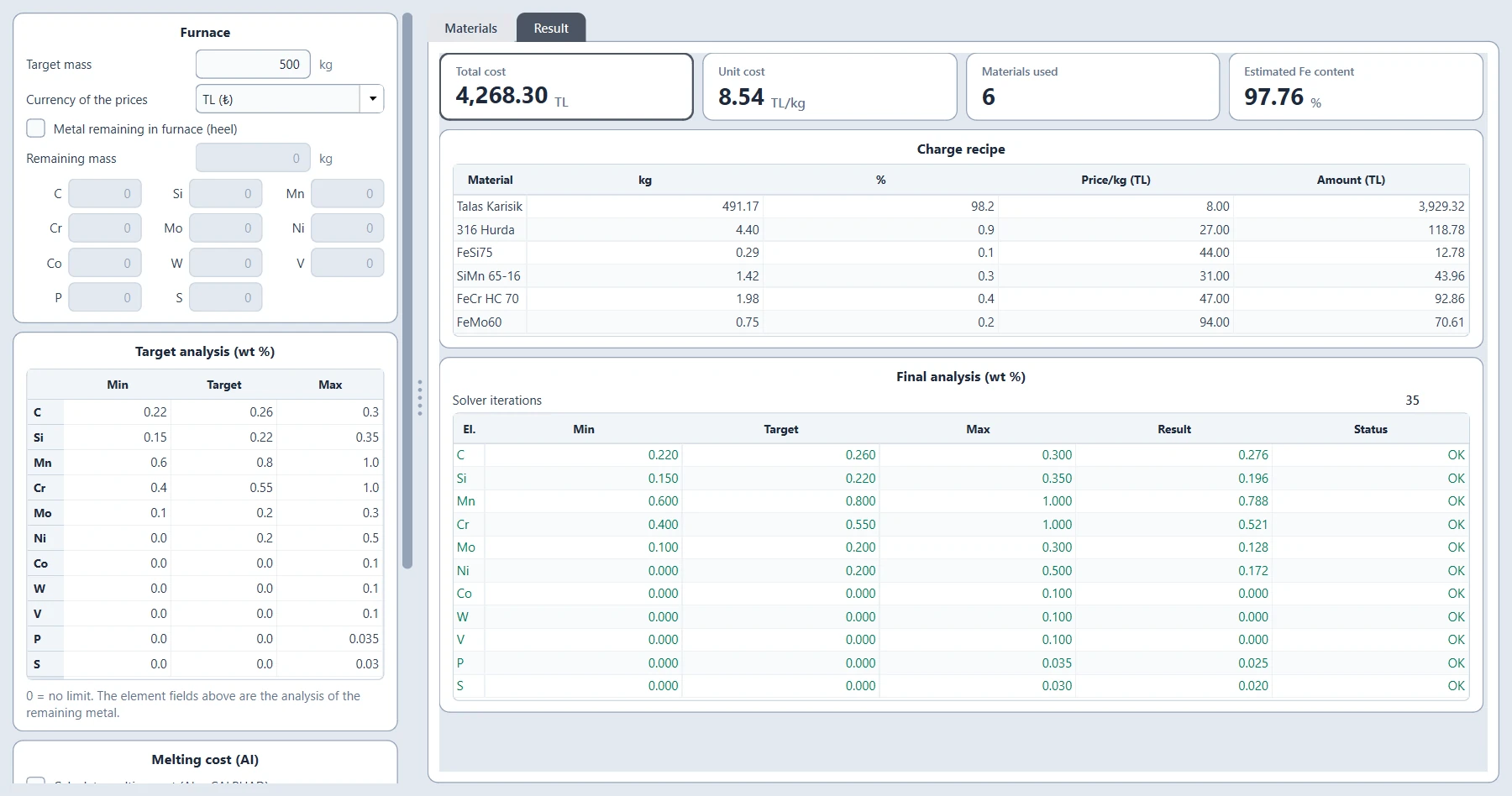
Finds the cheapest mix of your scrap, pig iron and ferroalloys that meets the target analysis. The material list and prices are kept in an Excel file; metal remaining in the furnace is taken into account.
- Minimum, target and maximum for 11 elements; the status of each element in the result
- Cost and unit cost in Turkish lira, euro or dollar
- Optional melting cost: theoretical melting energy from CALPHAD
- Bayesian machine learning that learns your furnace's efficiency and heat loss from every actual heat record
Gating sections, choke and riser
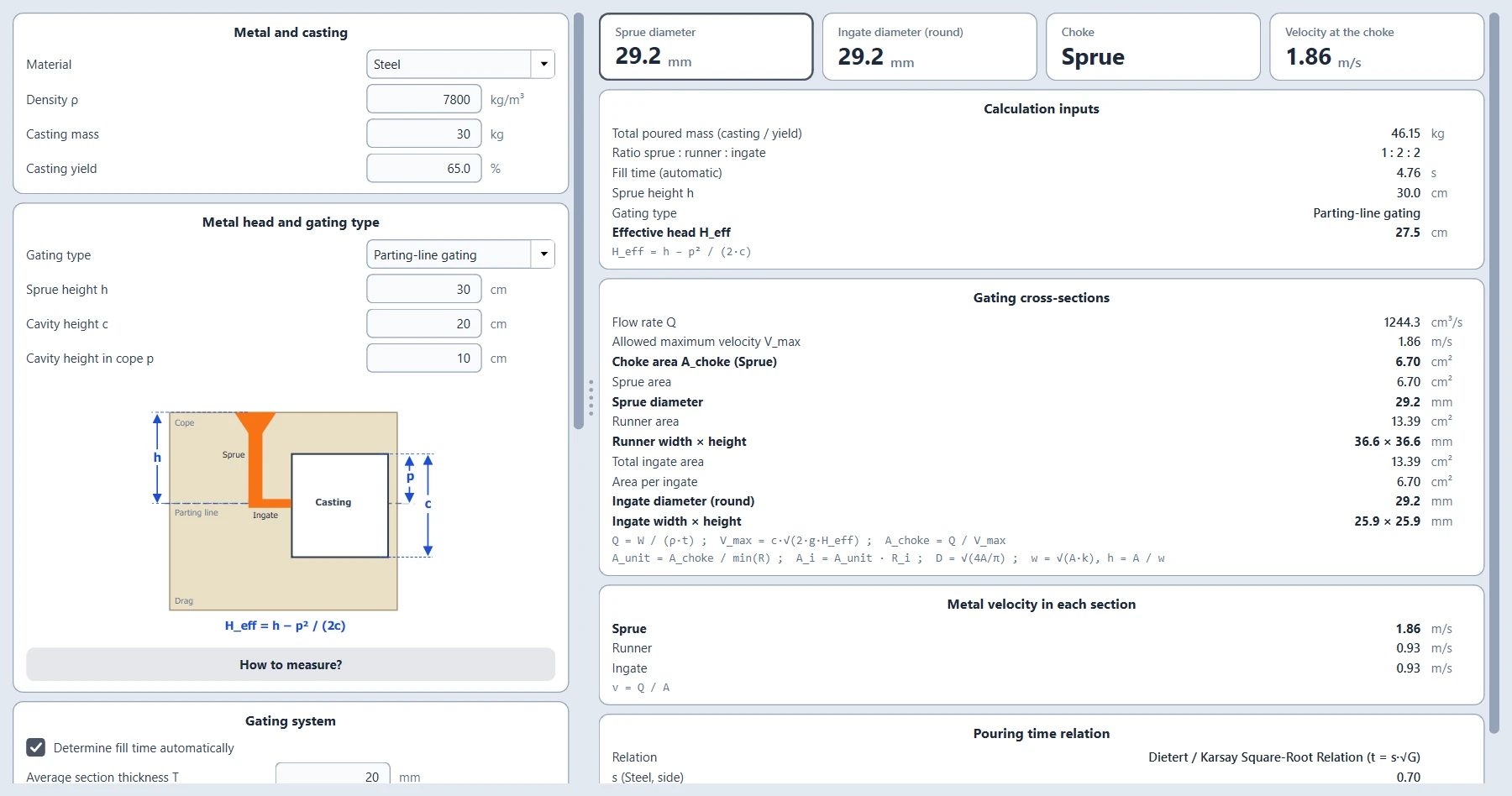
Derives the flow rate from the fill time and the allowed maximum velocity from the effective metal head; puts the choke at the smallest element of the ratio and gives sprue, runner and ingate dimensions as round and rectangular sections.
- Top, bottom and parting-line gating, each with a dimension drawing
- Riser by the modulus criterion (Wlodawer), only when you enter the volume and surface
Target fill time and pouring rate
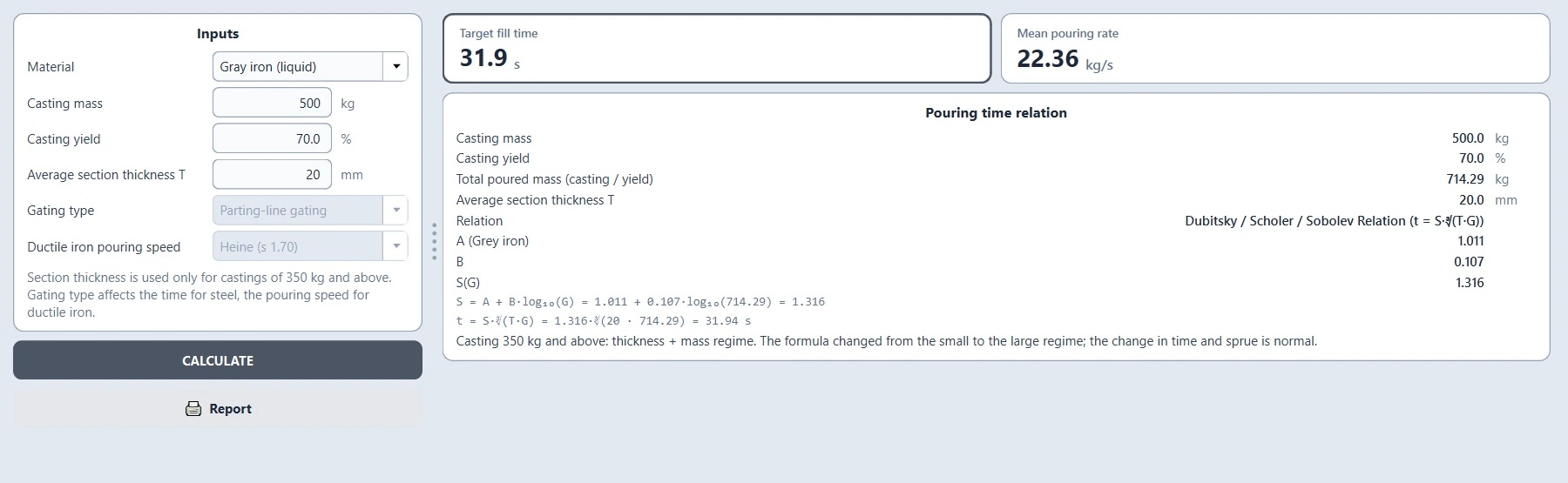
Finds the poured weight from the part weight and the yield, then calculates the target fill time and the mean pouring rate. Below 350 kg the time is set by mass; from 350 kg the average section thickness also counts. The coefficients can be calibrated to your foundry.
- Below 350 kg: Dietert / Karsay square-root relation; coefficient by gating type for steel and by pouring speed for ductile iron
- 350 kg and above: Dubitsky / Scholer / Sobolev relation; the coefficient rises with weight
- The gating module takes its fill time from here
Liquidus and pouring temperature: cast iron
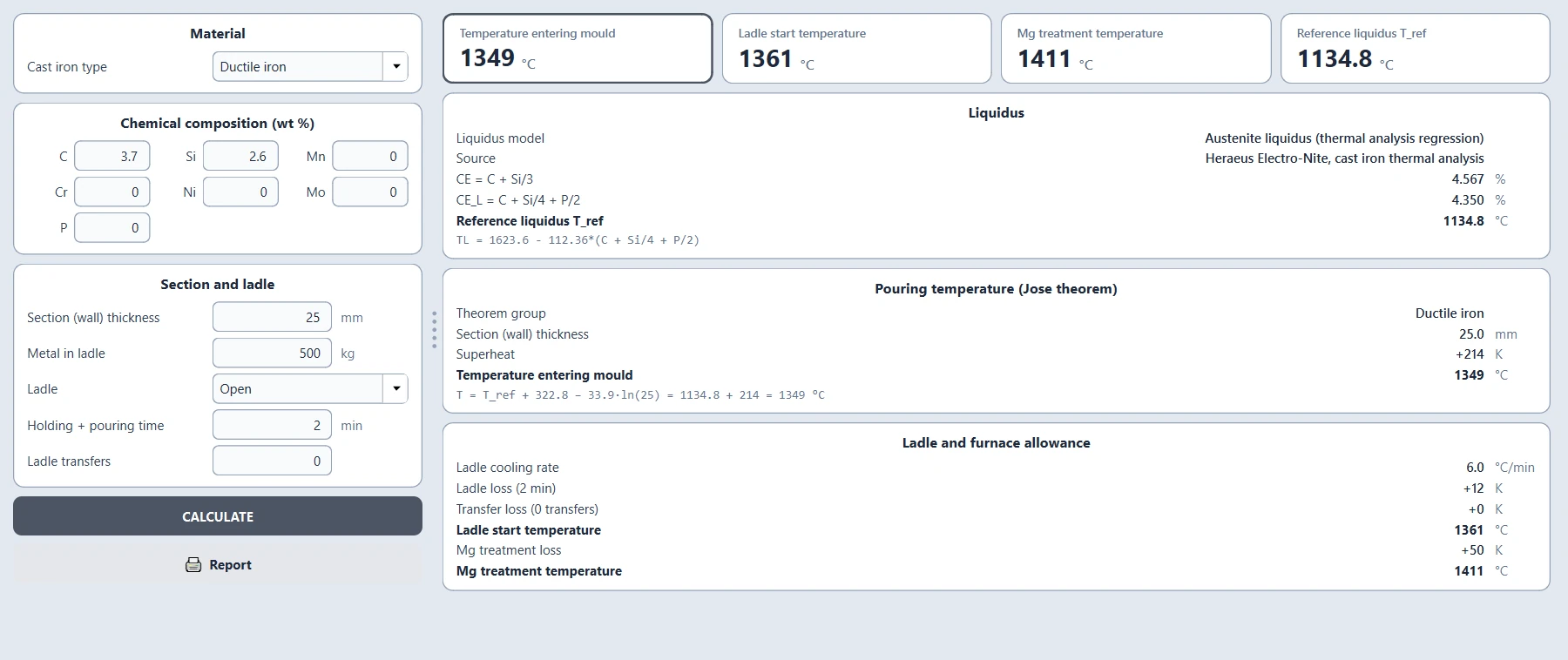
For grey, ductile, high-chromium white and Ni-Hard irons, finds the liquidus from the chemical analysis and the mould entry temperature from the section thickness; then adds the ladle and Mg treatment losses to work back to the ladle and furnace temperature.
- Liquidus: the Heraeus Electro-Nite thermal analysis relation
- Open or lidded ladle, holding and transfer losses (Foseco)
- Constants can be adapted to your foundry in the calibration window
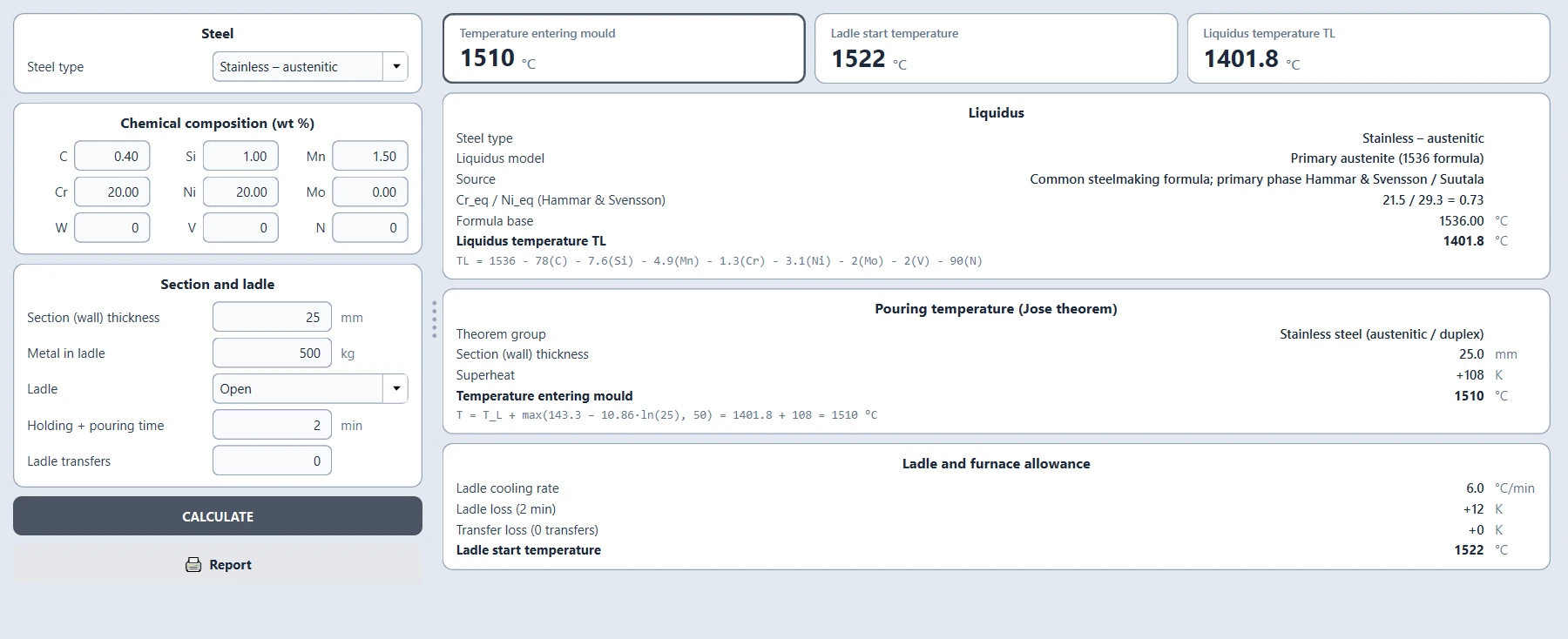
Liquidus and pouring temperature: steel
For carbon and low-alloy steels, stainless steels (austenitic, ferritic, martensitic, duplex) and tool steels, calculates the liquidus with formulas from the literature and the pouring temperature with the Jose theorem.
- The common 1536 formula for primary-austenite stainless steels (Hammar & Svensson / Suutala)
- The primary phase is chosen from the Cr_eq / Ni_eq ratio
- Families without a published source are clearly marked on screen
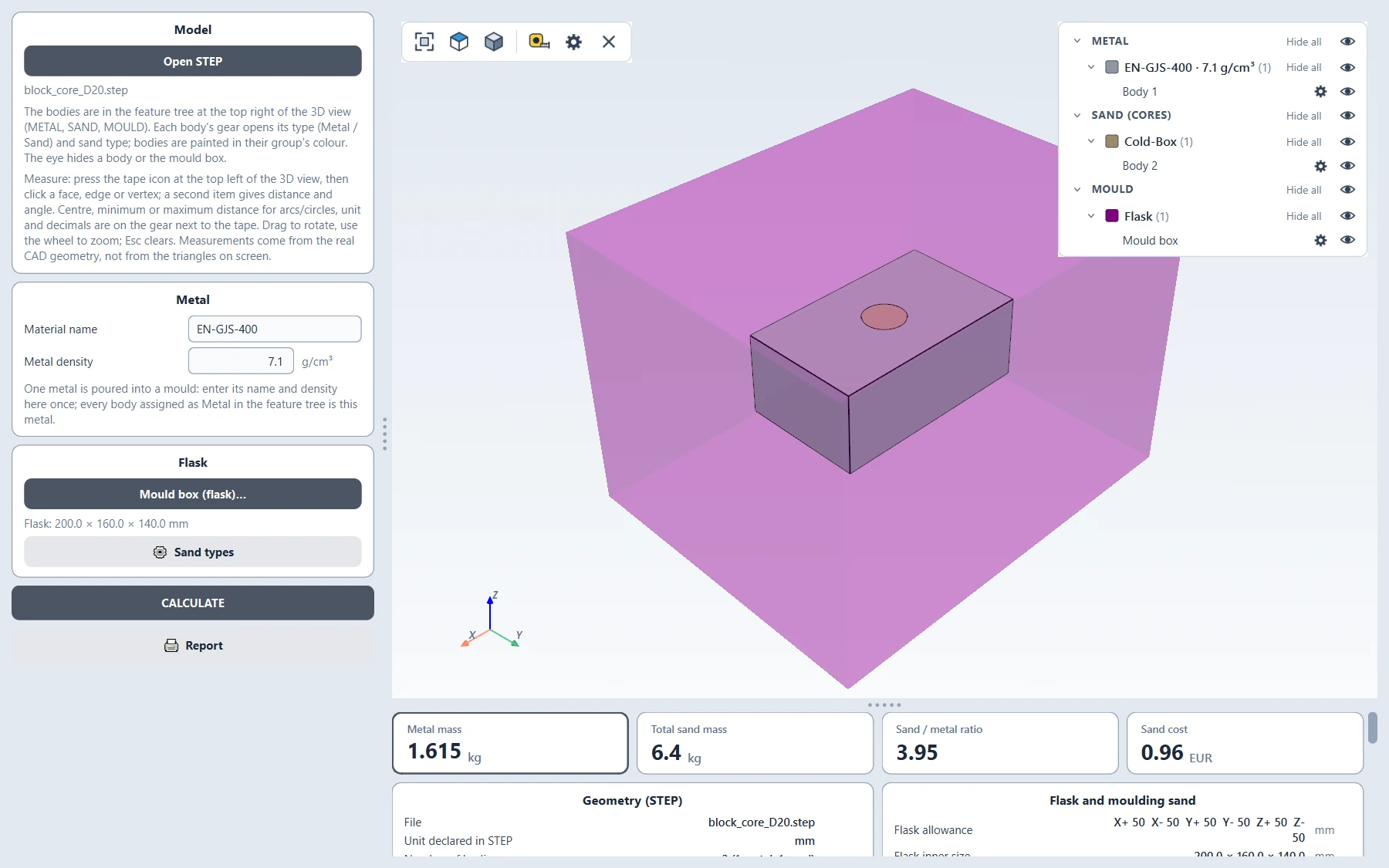
Dimensions, mass and moulding sand from STEP
Opens your STEP file and measures faces, edges and vertices as in a CAD program. Assigns bodies as metal or sand (cores), sets the flask in six directions and finds the flask sand by a Boolean cut.
- Measurements come from the real CAD geometry, not from the triangles on screen
- You define your own sand types and test values; the program has no defaults
- Binder, hardener, bentonite and moisture quantities; sand cost item by item, with a reclamation rate so only new sand is priced
Quality is in the details
The features shared by every module that set Suite apart from a calculator.
Calibration
Adjust the fill time coefficient and the Jose theorem constants to your foundry. Defaults come from the literature; every value you change is noted on the result screen.
Literature
The equation, source, validation and limits of every calculation are written down in the literature document shipped with the program.
Printable report
The result on screen opens in your browser as a single-file HTML report, with the inputs and drawings.
Local data
The material list, furnace records, sand types and settings are kept only in your Documents folder.
Six languages
The interface, explanations and error messages in Turkish, English, German, Japanese, Korean and Chinese.
Clear errors
Missing or invalid input is never silently corrected; the program tells you which field was not accepted and why.
See JoseCast Suite at work
An introduction video showing step by step how the modules are used on a real casting.
Download JoseCast Suite for free
Install from the Microsoft Store or download the installer directly. Both give you the same program, and both are free for life.
The Microsoft Store version is signed by Microsoft and updates itself. If Windows shows a warning when the directly downloaded version first starts, choose "More info" and then "Run anyway".